Explain PTP process along with accounting entry at each step.
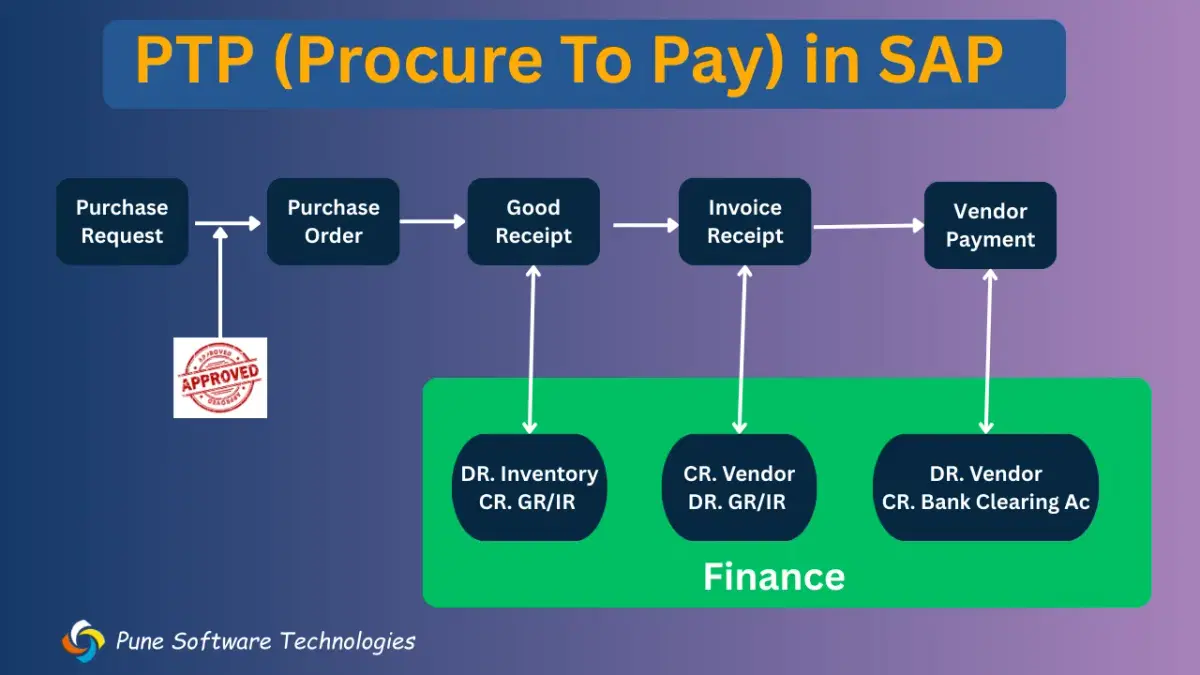
Below picture explain PTP process and corresponding accounting entry at each step.
1. Purchase Requisition (PR)
When any department needs materials or services, they create a purchase request.
It includes:
Material/service name
Quantity
Expected delivery date
Expected price
It is approved by the department head and finance team. After approval, the purchasing team creates a Purchase Order.
2. Purchase Order (PO)
The purchasing department sends the Purchase Order to the vendor.
It contains:
Vendor name
Material/service
Quantity
Price
Delivery date
Payment terms
Vendor supplies the goods and sends the invoice.
3. Goods Receipt (GR) – (T-code: MIGO)
When goods are received, GR is posted in SAP.
Accounting Entry:
Dr. Inventory
Cr. GR/IR
4. Invoice Receipt (IR) – (T-code: MIRO)
When the vendor invoice is received, it is posted in SAP.
Accounting Entry:
Dr. GR/IR
Cr. Vendor
Now, company has liability to pay the vendor.
5. Vendor Payment
Automatic Payment Program (APP) selects due invoices and processes payment.
Entry at payment:
Dr. Vendor
Cr. Bank Clearing
After bank statement upload:
Dr. Bank Clearing
Cr. Main Bank
Simple Flow:
Purchase Requisition → Purchase Order → Goods Receipt → Invoice Receipt → Payment